Definition
Security Information and Event Management (SIEM) system is a combination between Security Information Management (SIM) and Security Event Management (SEM). Its goal is to collect, aggregate and analyze real-time alerted events created by devices under its management.
It is very important that any scalable organization needs to have a SIEM system in their cybersecurity toolkit as it helps with consolidation of large amount of data and grasping the company’s security state. Through this grasp, it is also possible to understand the technological compliance of each device along with immediate compromise detection and efficient resolution of any arising issue.
If you are looking into post-incident digital forensics, check this TMA Solution.
Popular Solutions
Splunk is a commercially available solution with enterprise-grade large-scale data ingestion, analytics and visualization. It comes with an extremely powerful proprietary Splunk Search Processing Language (SPL), which allows for complex queries across massive datasets. Graylog is a SIEM with an open-source core accompanied by paid enterprise feature. This solution is for an organization that wants a seamless implementation of Elasticsearch and MongoDB while needing a simpler system with a modern web UI as well as a good plugin ecosystem provided straight from the manufacturer.
Both of these solutions require a large monetary amount while not being open-sourced. Wazuh is able to solve those issues by being free for highly budget-conscious organizations without compromising any capability. It uses an agent-based architecture to collect logs and security telemetry from each endpoint. Wazuh is highly customizable but comes with a rich security rule set out of the box for fast and easy deployment.
If you are looking at non-AD real-time data analytics, view this TMA Solution.
Deployment of Wazuh
Assuming the Active Directory (AD) environment has been preconfigured, there are two parts to the installation of Wazuh: the central server and the agents. The Wazuh Server component can be installed on a Linux machine using the following bash command (replace the x with the latest Wazuh version number):
- curl -sO https://packages.wazuh.com/4.x/wazuh-install.sh && sudo bash ./wazuh-install.sh -a
After creating the necessary credentials, the Wazuh web interface can be accessed through its host’s IP address.
_2025-09-05-10-23-40-183.webp)
The Wazuh Agent needs to be installed on each individual device under the AD to be the endpoint where the Wazuh Server can pull data from. For a Windows machine, it can be easily downloaded from the official Wazuh website. After launching the installer, the Wazuh Server’s IP address needs to be added along with running the following command in the terminal for it to start:
- sc start WazuhSvc
_2025-09-05-10-23-40-344.webp)
On the Domain Controller (DC), additional alerts can be sent to Wazuh by accessing the configuration file. The following command uses notepad via PowerShell to edit it:
- notepad ‘C:\Program Files (x86)\ossec-agent\ossec.conf’
To install the Wazuh Agent on Linux, the following commands need to be entered to download the installation file (replace the x with the latest Wazuh Agent version number):
- curl -sO https://packages.wazuh.com/4.x/apt/install.sh
- sudo bash ./install.sh
After installing the agent, the Wazuh Server’s IP address needs to be entered. The following command uses nano to edit the configuration file:
- nano /var/ossec/etc/ossec.conf
_2025-09-05-10-23-40-414.webp)
The following commands are used to start the Wazuh Agent service as well as setting it to run at boot:
- sudo systemctl enable wazuh-agent
- sudo systemctl start wazuh-agent
Now the Wazuh SIEM system has been configured to start working.
Overview of the Wazuh Functions
When you access Wazuh’s web interface, initially you will be put in the Overview tab (Figure 5). This tab shows Agents Summary, the last 24-hour alerts and the four main categories of Wazuh’s functions. Each of them can be redirected to a more detailed interactive page. The Agents Summary shows the currently active/connected Wazuh Agents. The last 24-hour alerts are listed in their quantity of each level group. The categories are Endpoint Security, Threat Intelligence, Security Operations and Cloud Security.
_2025-09-05-10-26-10-424.webp)
As defined earlier, each device under Wazuh’s management is an endpoint. Endpoint Security has three functions: Configuration Assessment, Malware Detection and File Integrity Monitoring. Configuration Assessment evaluates each endpoint to determine if it is configured to the settings predetermined by the administrator or by a regulated standard. Malware Detection checks each endpoint for any signs or indicators of compromise caused by malware or cyber-attacks.
Threat Intelligence encompasses Threat Hunting, Vulnerability Detection and MITRE ATT&CK. Threat Hunting actively parses through the alert logs to find threats while Vulnerability Detection checks each individual application for possible well-known vulnerabilities. MITRE ATT&CK on its own is an encyclopedia containing a malicious attacker’s tactics, techniques and sub-techniques based on real-world observation. Wazuh uses this library of information to map detected security events to known attacker behaviors in the MITRE framework.
Security Operations allow the user to view the alert logs under the lens of its five supported standards: PCI DSS, GDPR, HIPAA, NIST 800-53 and TSC. The main goal of this section is to allow for direct compliance check of Wazuh Agents to each of these standards. Wazuh also allows for further customization and option settings of the compliance level along with additional filtering.
Cloud Security helps with increasing the security of popular cloud platforms by providing in-depth monitoring for cloud platforms Docker, Amazon Web Services, Google Cloud, GitHub, and Office 365. Wazuh allows for log monitoring, instance monitoring, additional analytics with graphs and module integrations depending on the cloud platform chosen.
Case Study: Detecting a Kerberoasting Attack
What is Kerberos and the Kerberoasting Attack?
Kerberos is a third-party authentication services based on tickets. Its goal is to allow for authentication through an unsecure network. The Kerberos Architecture contains the client requesting for service access, the server hosting the services and the Key Distributing Center (KDC) consisting of the Authentication Server (AS) and the Ticket Granting Server (TGS). The AS authenticates the user initially before the TGS issues that user’s service ticket.
After the authentication phase with the KDC, an authenticated user would then request for a service ticket from the TGS. Usually, the TGS would respond with the appropriate server session key and service account as asked. But an attacker that has already gained access to a domain user account, would forge a TGS Request message so that the TGS returns with all service accounts with a Service Principal Name (SPN) associated with that domain user. The attacker can now then crack for that service account password via the hash returned in the TGS Response. This is the Kerberoasting Attack. The goal of this attack is to create a pathway to access the service down the line without the need to authenticate nor interact with the KDC in any shape or form.
Scenario
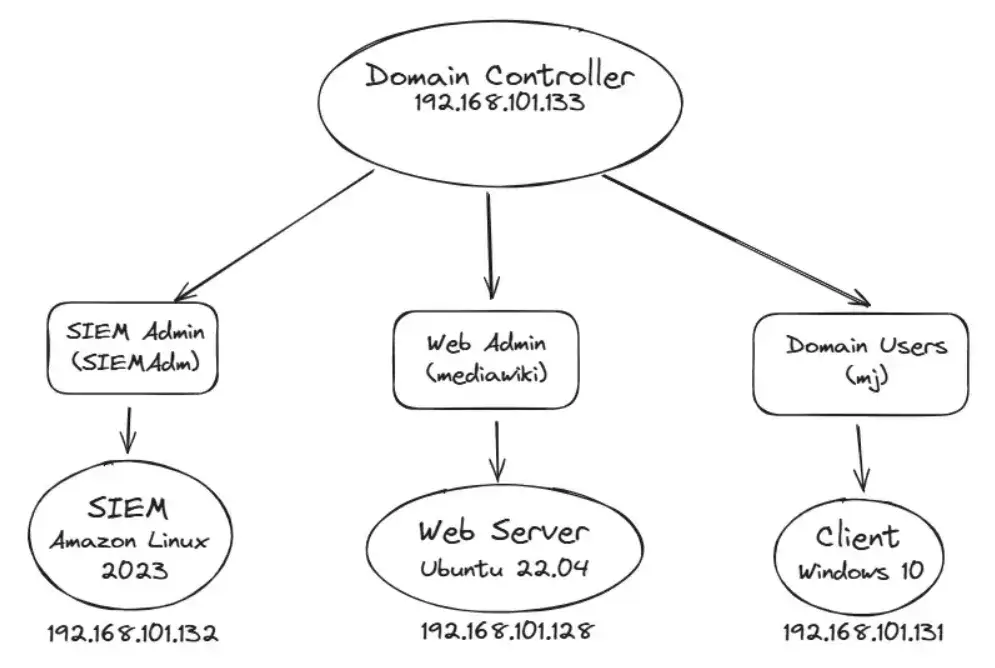
QCK Corporation has an Active Directory environment with the domain name qck.corporation.com, which contains a Wazuh SIEM running on Amazon Linux 2023, a Windows Server 2022 working as the Domain Controller (DC), another Windows Server 2022 machine working to provide Microsoft SQL service and a Windows 10 client machine. The attacker has gained access to a regular domain user account along with the local administrator account of that Windows 10 client machine. The security team mission is to configure the DC to report its log to the Wazuh SIEM so that it can recognize and alert the Kerberoasting Attack.
Configuration for Detection
The first step to detecting a Kerberoasting Attack is to enable Kerberos TGS Auditing on the DC. That can be done by going into Group Policy Management > Computer Configuration > Windows Settings > Security Settings > Advanced Audit Policy Configuration > Audit Policies > Account Logon. It is recommended that both “Success” and “Failure” are selected for the logging (Figure 6). To force the Group Policy update, the administrator may run “gpupdate /force” in the Command Prompt to get the policy to the latest version as soon as possible.
_2025-09-05-10-39-17-447.webp)
Using notepad, the ossec.conf file must be changed to ensure that the Wazuh Agent on the DC reads the Security event channel as in Figure 7. On the Wazuh Server itself, a custom rule must be added for the alert of the Kerberoasting Attack (Figure 8). Else, the alert will not show up on the Wazuh Dashboard. The final step is to restart the Wazuh Server for these configuration changes to come into effect using “sudo systemctl restart wazuh-manager”.
_2025-09-05-10-39-18-276.webp)
_2025-09-05-10-39-18-434.webp)
Steps for the Attack
The attacker first logs into the Windows 10 client machine via the regular domain user account and disables Windows Defender, especially important for them to turn off real-time protection. They can now launch an administrator-privileged PowerShell instance using their local administrator credential and put a copy of the Kerberoasting Master suite along with Mimikatz on said machine.
The attacker starts the attacker by requesting for all service accounts with an SPN using the python script GetSPNUsers.py as in Figure 9.
_2025-09-05-10-39-18-721.webp)
They have discovered that the Microsoft SQL Service account is associated with this domain user. The next step is to store the Kerberos Requestor Security Token in an object to be called upon later (Figure 10). The attacker can now export the Kerberos TGS ticket using Mimikatz (Figure 11). The attacker can now proceed to crack this ticket. In this case, they want to export it to a Kali Linux machine to perform these actions. Using a John the Ripper module called kirbi2john, the attacker is able to strip the SPN hash from the kirbi file (Figure 12). The text file containing the hash can be cracked using a dictionary attack with HashCat using the rockyou.txt word list (Figure 13 and Figure 14).

_2025-09-05-10-39-18-950.webp)
_2025-09-05-10-39-19-419.webp)
_2025-09-05-10-39-19-440.webp)
_2025-09-05-10-39-19-668.webp)
Wazuh Log Output
After entering the credentials for Wazuh in the Wazuh web interface, on the left-hand side, the security team can click onto the “Discover” tab to view all received logs. The rule.description field can be selected to show what that particular alert is about; they can see that “Possible Kerberoasting Attack” has been alerted (Figure 15).
_2025-09-05-10-39-20-065.webp)
Conclusion
In every AD environment, it is very important for an organization to fully grasp the current state of their security quickly and accurately. A SIEM is able to collect, aggregate and analyze these data for this purpose. Wazuh is an excellent fully-free and open-source SIEM solution that is feature-rich with vast amount of community support for this mission. Without a SIEM, it would be very difficult for any organization at any size to comprehend, let alone understand all logs and alerts from their devices.