Mobile devices have completely transformed how we work. A decade ago, most of us had to sit at a desk and work on a desktop computer in a small office. Now, people can check email from a coffee shop or join video calls while shopping. This trend has brought us flexibility and productivity—but along with it, new security challenges.
The Bring Your Own Device movement, or BYOD as it's commonly called, has become the norm rather than the exception. Companies love it because they don't have to shell out thousands of dollars for devices. Employees love it because they get to use the phones and tablets they're already comfortable with. Everyone's happy, right? Well, not quite. The security teams are pulling their hair out, and for good reason.
When you let people use their personal devices for work, you're essentially inviting all their personal habits, apps, and security practices into your corporate environment. That Instagram app they downloaded? It's sitting right next to your company's financial database app. Their kids' gaming apps? Those are on the same device that has access to customer data. You see the problem.
What Makes BYOD So Tricky?
The reality is that BYOD introduces several serious threat vectors. Data can leak through innocent-looking apps that sync to personal cloud storage. Devices connect to sketchy public WiFi networks at airports and hotels. People download apps from unofficial sources or click on phishing links in their personal email. Weak passwords and unlocked devices make it easy for someone who steals or finds a phone to access everything on it. And perhaps most concerning, there's often no real separation between personal stuff and work stuff - it all lives together in one digital melting pot.
The OWASP organization, which focuses on web and mobile application security, has documented many of these issues in their Top 10 lists. They highlight problems like broken access control, where users can access data they shouldn't be able to see. Security misconfiguration, where default settings leave systems vulnerable. Sensitive data exposure, where information isn't properly encrypted or protected. These aren't just theoretical concerns - they're the actual vulnerabilities that attackers exploit every single day.
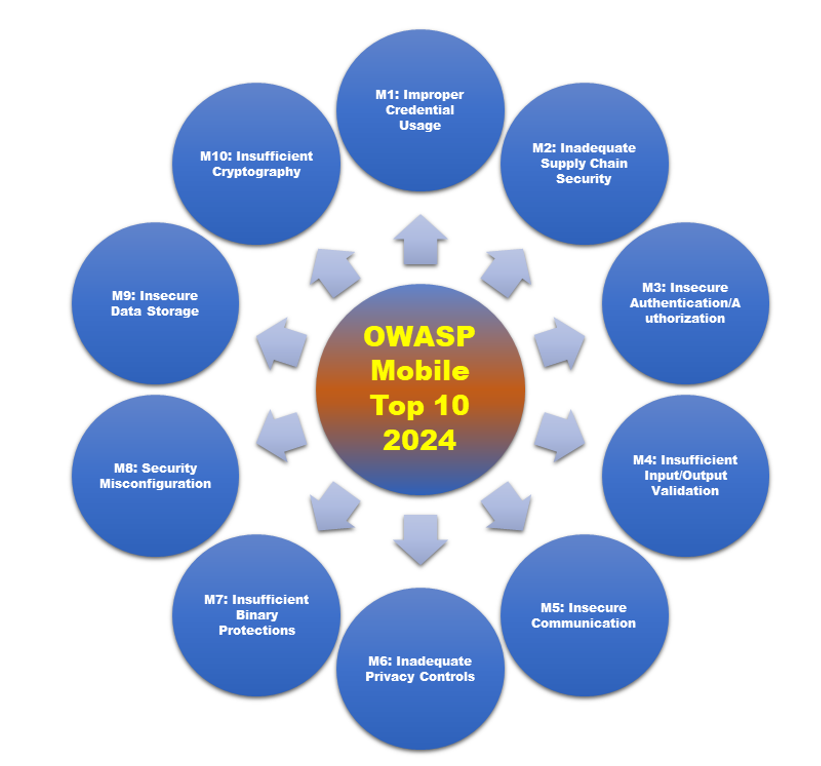
The Threats Are Real and Growing
Mobile devices face a completely different threat landscape than traditional computers. Both Android and iOS use sandboxing to keep apps separated from each other, and they have permission systems that are supposed to prevent apps from doing anything too dangerous. But these protections are only as good as the weakest link, and in BYOD environments, there are a lot of weak links.
Here's a concrete example: imagine a business app that doesn't properly validate SSL certificates when connecting to your company's servers. A tech-savvy attacker sitting in the same coffee shop could perform what's called a Man-in-the-Middle attack, intercepting the communication between the app and the server. They could steal login credentials, grab sensitive data, or even modify the information being transmitted. If the app stores passwords or authentication tokens in plain text on the device itself, that's even worse - anyone who gets access to the phone can grab those credentials and use them.
Network threats are another huge concern. BYOD devices are constantly hopping between networks - from home WiFi to cellular data to the free WiFi at Starbucks. Each network transition is an opportunity for something to go wrong. Public WiFi networks are particularly dangerous because you never really know who's running them or who else is connected. Without proper encryption and secure tunneling through VPNs, your company's data is traveling across networks that attackers can easily monitor.
The encryption piece is crucial here. OWASP talks about cryptographic failures as a major vulnerability category, and it's easy to see why. If an app uses outdated encryption protocols, or worse, doesn't encrypt data at all, that information is essentially traveling in the clear. It's like sending postcards instead of sealed letters - anyone who handles them along the way can read the contents.
But you know what the biggest vulnerability is? People. Humans are unpredictable, forgetful, and sometimes just plain careless. In a BYOD environment, you have employees installing whatever apps catch their fancy, clicking on suspicious links because they're curious, and putting off software updates because they don't want to restart their phones. Some people jailbreak their iPhones or root their Android devices to get around restrictions, which completely undermines the built-in security features.
The Big Challenges That Keep Security Teams Up at Night
Securing BYOD environments means juggling multiple competing priorities. You need to protect company data, respect employee privacy, comply with various regulations, and still make everything usable enough that people will actually follow the policies. It's a delicate balance, and getting it wrong can be costly.
The control problem is fundamental. When the company owns the devices, they can install whatever security software they want, configure settings however they need, and monitor everything that happens. When employees own the devices, all of that becomes much more complicated. You might want to encrypt all data on the device, but you can't just force that to happen. You might want to remotely wipe the device if it's lost, but you need permission first, and even then, you're wiping someone's personal photos and contacts along with the work data.
Privacy laws make this even trickier. In many places, there are strict rules about what employers can and can't monitor on personal devices. Even if you could technically track every app someone installs or every website they visit, you probably shouldn't from a legal and ethical standpoint. This creates blind spots in your security posture. OWASP discusses security misconfiguration as a major issue, and BYOD environments are particularly prone to this because it's so hard to apply consistent configurations across devices you don't fully control.
Authentication is another major challenge. Strong security requires strong authentication - long passwords, multi-factor authentication, biometrics, the works. But people hate jumping through security hoops, especially on personal devices where they're used to just swiping to unlock. They'll use weak PINs because they're easier to remember. They'll reuse passwords across multiple accounts. They'll stay logged in indefinitely because re-authenticating is annoying.
OWASP highlights identification and authentication failures as a critical vulnerability type, and it's easy to see why in BYOD contexts. If an app stores authentication tokens insecurely, or doesn't properly invalidate sessions when someone logs out, or allows unlimited login attempts, attackers can exploit these weaknesses to gain unauthorized access. The stakes are even higher with BYOD because that same device might be logged into multiple accounts - personal email, social media, banking apps, and corporate systems all at once.
Finally, there's the diversity problem. In a corporate environment where everyone gets the same model laptop with the same OS version, security is relatively straightforward. In BYOD, you might have hundreds of different device models, running different OS versions, at different security patch levels. Android is particularly fragmented - there are thousands of different Android devices out there, and many manufacturers are terrible about pushing out security updates.
How to Actually Protect BYOD Environments
So we've covered all the scary stuff - the vulnerabilities, the threats, the challenges that make security professionals lose sleep. Now let's talk about what you can actually do about it. Securing BYOD isn't about implementing one magic solution; it's about building multiple layers of protection that work together. Think of it like home security - you don't just install a lock on the front door and call it a day. You also get deadbolts, maybe an alarm system, motion-sensor lights, and you teach your family not to open the door to strangers.
Mobile Device Management and Keeping Things Contained
The foundation of any BYOD security strategy is usually some kind of Mobile Device Management or Enterprise Mobility Management platform. These are the systems that give IT departments at least some control over devices they don't actually own. With MDM or EMM solutions, you can enforce certain basic security requirements across all devices that connect to your network.
What can these systems actually do? They can require that devices be encrypted, so if someone loses their phone, the data on it isn't just sitting there readable by anyone who picks it up. They can enforce strong passwords or biometric authentication - no more four-digit PINs that are just someone's birthday. They can give IT the ability to remotely wipe corporate data if a device is stolen or an employee leaves the company. They can control which apps are allowed to access company resources and which ones are blocked. And they can enforce VPN usage and manage security certificates that authenticate connections.
Embracing Zero Trust Because Trust Is a Liability
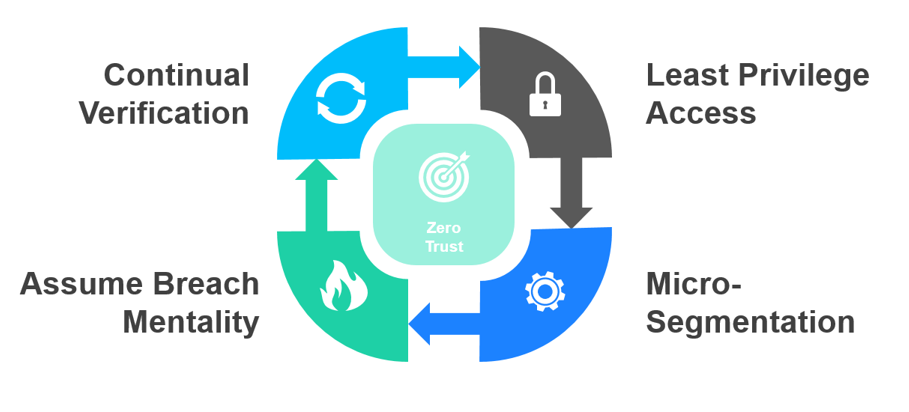
There's been a major shift in security thinking over the past few years, and it's particularly relevant for BYOD. It's called Zero Trust Architecture, and the name pretty much says it all - you trust nothing and verify everything. This might sound paranoid, but in a world where employees are accessing corporate systems from their personal devices over public WiFi networks, paranoia is actually pretty reasonable.
Traditional security models assumed that once someone was inside your network, they were probably trustworthy. The firewall kept the bad guys out, and everyone inside was presumed to be legitimate. That model completely falls apart with BYOD because there is no clear network perimeter anymore. Devices are constantly moving between networks, connecting from home, from coffee shops, from airports. How do you define "inside" and "outside" when everything is mobile?
Zero Trust throws out that old assumption entirely. Instead of trusting devices that appear to be on the network, Zero Trust continuously validates who's accessing what, from where, and whether they should be allowed to do so. It's not just about checking credentials once at login - every single transaction gets scrutinized based on current context.
The really powerful thing happens when you integrate Zero Trust with your MDM or unified endpoint management system. Now device health directly impacts access decisions. If someone's phone hasn't been updated in six months and is running vulnerable software, the system can automatically restrict what they can access until they update. If a device shows signs of being jailbroken or rooted, it might get blocked entirely from corporate resources.
This approach directly addresses some of the biggest vulnerabilities in the OWASP Top 10, particularly broken access control and insecure design. By constantly verifying and adapting, Zero Trust transforms BYOD from a trust-based free-for-all into a risk-adaptive system that's much harder for attackers to exploit. You get to keep the benefits of mobility and flexibility without leaving the door wide open to threats.
Read more about Zero Trust for Cyber security here
Testing Your Defenses Before Attackers Do
Here's a best practice that organizations often skip, usually because of budget constraints or time pressure: mobile penetration testing. If you're not familiar with the term, penetration testing means deliberately trying to break into your own systems to find vulnerabilities before the bad guys do. It's like hiring a professional burglar to test your home security - they use the same techniques and tools as real criminals, but they tell you what they found instead of stealing your stuff.
What does mobile pentesting actually involve? There are several different components that all need to be examined. First, there's application testing, where security researchers look at your Android and iOS apps specifically for the vulnerabilities listed in OWASP's Mobile Top 10. They'll check whether communications are properly encrypted, whether data is leaking where it shouldn't, whether session management is secure, and dozens of other potential issues.
Device configuration is another critical area. Pentesters will examine whether devices are properly encrypted, whether screen locks are strong enough, whether the device has been rooted or jailbroken (which breaks down security barriers), and whether the OS version is current and patched. Each of these factors can dramatically impact overall security.
Then there's testing the APIs and backend systems that mobile apps connect to. Modern apps are usually just front ends that talk to servers and databases on the backend. Those server-side systems need to be tested for authentication flaws, injection vulnerabilities, and something called Broken Object Level Authorization where users can access data that should belong to someone else. Just because your mobile app looks secure doesn't mean the systems it talks to are protected.
The tools for mobile pentesting are pretty sophisticated these days. Security researchers use frameworks like Burp Suite Mobile Assistant for intercepting and analyzing traffic, Frida for dynamic instrumentation that lets them modify app behavior in real-time, MobSF for automated security scanning, and OWASP ZAP for finding vulnerabilities in web services and APIs. These automated tools are combined with manual testing where experienced security professionals try to think like attackers and find creative ways to break things.
The key thing about penetration testing is that it's not a one-and-done activity. Threats evolve, new vulnerabilities are discovered, and your apps and infrastructure change over time. Regular pentests - maybe quarterly or at least annually - combined with continuous monitoring and even bug bounty programs where external researchers can report vulnerabilities for rewards, help ensure you're keeping pace with the threat landscape.
Beyond just finding security holes, penetration testing also helps with compliance. If you're subject to regulations like ISO 27001, GDPR, or NIST standards for mobile security, being able to demonstrate that you regularly test and validate your security controls is often a requirement. But more importantly, pentesting gives you actionable information. Instead of vague security advice, you get specific findings like "this API endpoint is vulnerable to SQL injection" or "this app stores authentication tokens in plaintext." Those are things your development team can actually fix.
Check out the mobile pentest article of TMA Insight here
Wrapping It All Together
Security in BYOD environments isn't a destination you reach - it's an ongoing journey that requires constant attention, adaptation, and improvement. But with the right strategies, tools, and mindset, it's a journey that leads to both stronger security and a better employee experience. And in today's world, that's exactly what organizations need to succeed.


.webp_2026-10-01-18-27-07-971.webp)
.webp_2026-10-01-18-17-11-290.webp)
.webp_2026-10-01-18-08-26-854.webp)
.webp_2026-10-01-17-47-32-240.webp)