Businesses handle invoices, contracts, purchase orders, application forms, and financial records every day. Much of the information in these documents must reach accounting software, customer records, or operational systems before employees can take action. When teams collect and enter that information manually, growing document volumes can create delays and inconsistent records.
Document processing solutions help businesses turn incoming files into organized, usable data. By combining document recognition, information extraction, validation, and system integration, these solutions reduce repetitive work while keeping employees involved in decisions that require judgment.
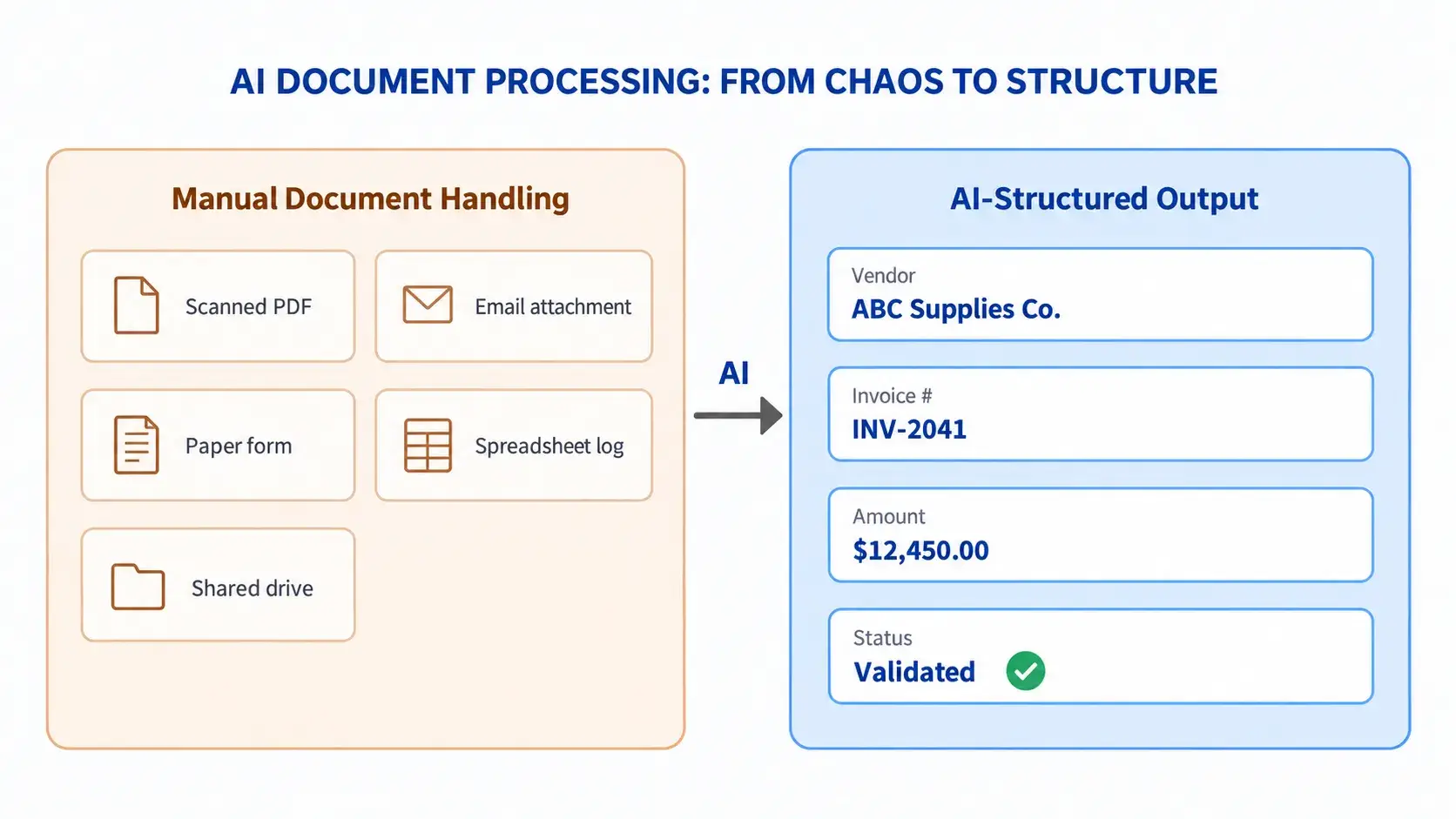
Turning documents from different sources into organized, usable business data
Why do businesses need document processing solutions?
Document handling becomes difficult when information arrives through different channels and in different formats. A finance team may receive supplier invoices, scanned receipts, and purchase orders in different layouts. Employees then need to locate the relevant information, check it against related records, and enter it into the correct system.
This work involves more than typing. Staff may need to search for missing references, compare totals, or contact colleagues about unclear details. When documents are stored separately from business records, it also becomes harder to understand why a payment or order is waiting.
Document processing solutions provide a consistent approach to these activities. They help teams capture information earlier, apply agreed checks, and direct exceptions to the right reviewer. The objective is to reduce time spent preparing information so employees can focus on resolving issues and completing business tasks.
How AI document processing solutions work
A document processing system connects several steps, from receiving a file to delivering approved data. Each step should reflect the document type, the quality of the input, and the requirements of the receiving system.
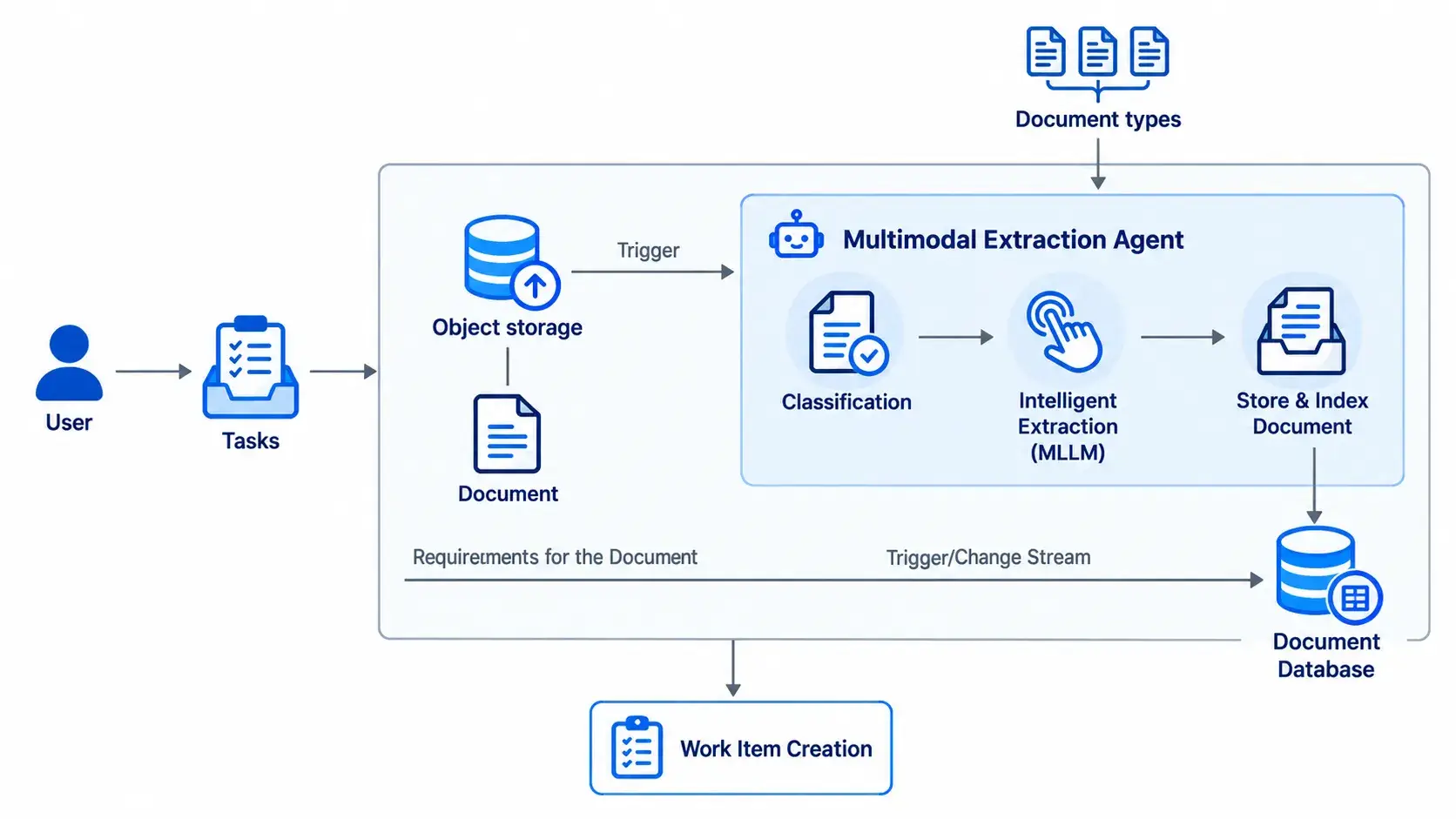
Automatically identify document types, extract key information, and organize data for business use
Collect and classify incoming documents
Documents enter the workflow through uploaded files or configured data sources. The system classifies supported document types, such as invoices, contracts, and purchase orders, to determine which extraction fields and processing rules apply. Business users can introduce new document types by annotating sample documents, defining schemas, mapping fields, and validating extraction results before use.
Read and extract relevant information
Optical character recognition, or OCR, converts text in scanned documents and images into machine-readable content. Additional AI capabilities can help interpret layouts, identify tables, and locate fields such as supplier names, invoice numbers, payment terms, and line items.
The extracted details are organized into a defined structure. For example, an invoice workflow may require the supplier name, invoice date, currency, total amount, and purchase order reference as separate fields.
Validate information and review exceptions
Document processing solutions can check extracted values against business rules or reference records. A workflow might flag a missing invoice number, an unexpected currency, or a mismatch between line items and the stated total.
Unclear or incomplete results should be sent to a reviewer. Employees can compare extracted values with the original document before approving or correcting them. This review step is especially useful when documents are difficult to read or when errors could affect downstream decisions.
Send approved data to business systems
Once the required checks are complete, approved information can be transferred through configured integrations. The configured workflow can also create a review task, update a record, or notify the responsible team. Extracting a value does not automatically authorize a payment or approve a contract; those actions remain governed by the business workflow.
Turning different document formats into usable data
Suppliers and departments rarely use identical layouts. An invoice number may appear at the top of one document and beside a payment table in another. Contracts may describe similar obligations using different language, while scanned forms can contain handwritten additions or unclear text.
Intelligent document processing combines recognition and interpretation to handle supported variations. It still requires configuration, representative samples, and validation. Businesses should test documents from different sources rather than assume one successful sample represents the entire workflow.
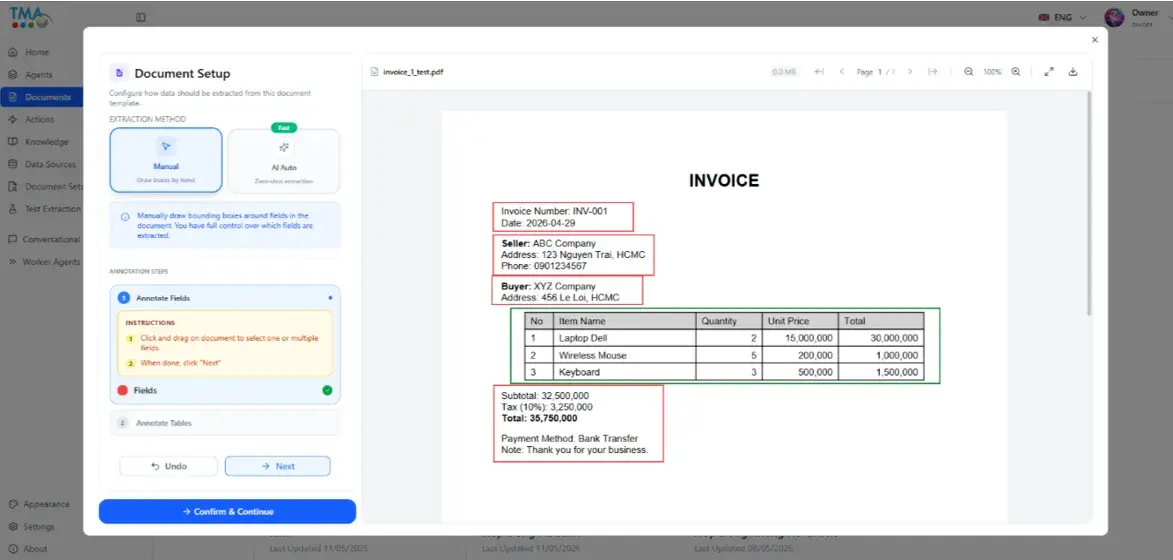
Identify key information from sample documents and automatically extract similar details from future documents
Effective document processing solutions define the required output clearly. Teams agree on field names, data types, mandatory values, and exception rules before connecting the workflow to another application. Dates, currencies, and supplier references can then be standardized for consistent downstream use.
This approach makes information easier to search and compare. It also avoids treating a block of extracted text as a complete business record when essential fields are still missing.
Connecting document data with existing systems
Document processing solutions help businesses put extracted information to work through configured integrations with databases, ERP, CRM, and other business applications.
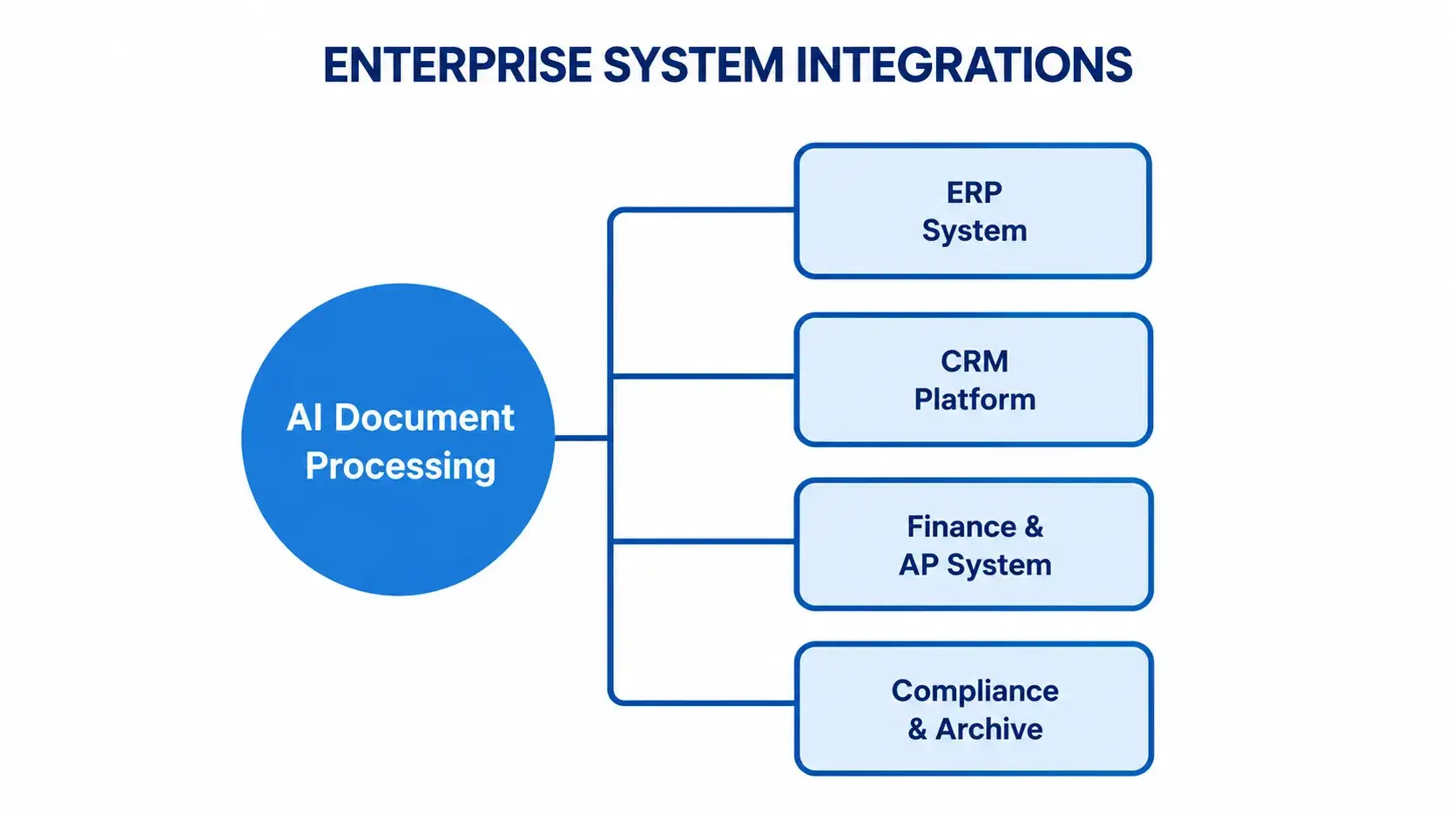
Processed document data routed directly into ERP, CRM, finance, and compliance systems
For example, invoice details can support accounting workflows, while information extracted from goods receipt records can support inventory updates. The data transferred and the actions performed depend on the connected system and the configured business rules. This helps reduce repeated data entry and helps teams use document information within their existing workflows.
Business applications across different departments
The following examples show how document processing solutions can support specific activities across departments. The exact scope depends on the available documents, business rules, and system integrations.
Finance and accounting
The system can capture invoice headers and line items, check mandatory information, and compare selected fields with purchase order records. Finance staff review discrepancies before the information proceeds to accounting or payment preparation.
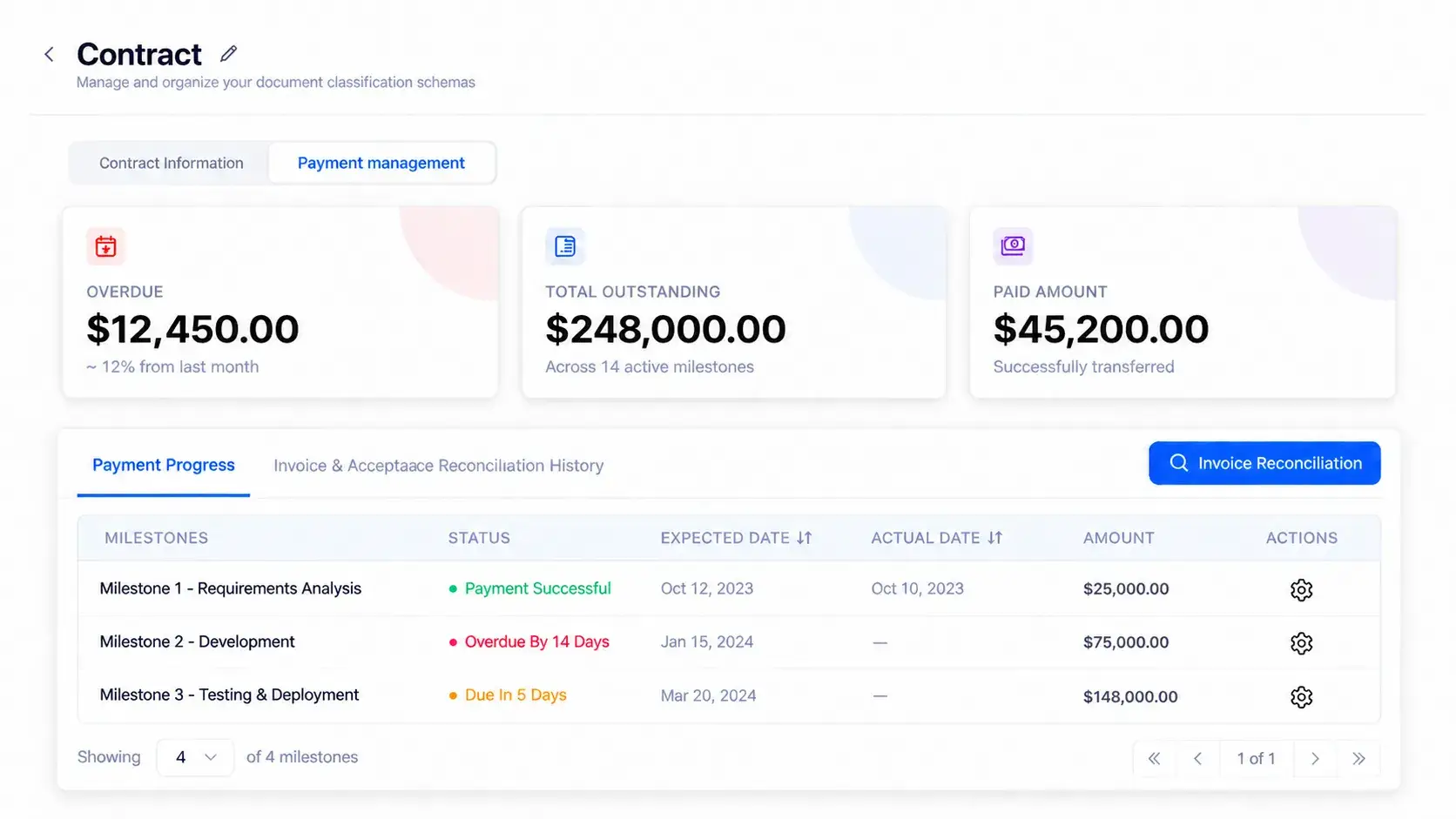
Track contract payments, outstanding balances, and milestone progress in one view.
Based on the configured workflow, T-docAgent can generate payment orders for human approval and update accounts payable records. Employees can focus on reviewing exceptions rather than repeatedly entering and comparing document data.
Legal and procurement
Extract important information from contracts, such as payment terms, deadlines, and key milestones. This makes it easier for teams to review agreements, track obligations, and monitor payment-related activities.
Operations and order management
Process purchase orders, goods receipt records, and delivery documents more efficiently. By comparing information across related documents, businesses can identify differences and reduce time spent on manual checks.
These applications help businesses simplify document-heavy workflows, improve information accuracy, and allow employees to focus on tasks that require human attention.
Conclusion
Automating document processing helps businesses reduce manual work, improve data accuracy, and manage information more efficiently. By starting with high-volume documents such as invoices, contracts, or purchase orders, organizations can gradually expand automation across different departments.
Ready to simplify your document workflows?
Contact TMA Solutions to explore how AI-powered document processing can help your business save time, reduce errors, and improve operational efficiency.
FAQ
Q1: How is an AI document processing system different from basic OCR software?
A1: Basic OCR only converts images to text. An AI document processing system adds classification, structured field extraction, validation, and integration with enterprise systems — turning raw text into usable, routed data.
Q2: Can it handle documents from different vendors or in different formats?
A2: Yes. Because extraction is based on learned document types rather than a single fixed template, the system adapts to format variations across vendors and departments rather than breaking on anything that doesn't match a rigid template.